
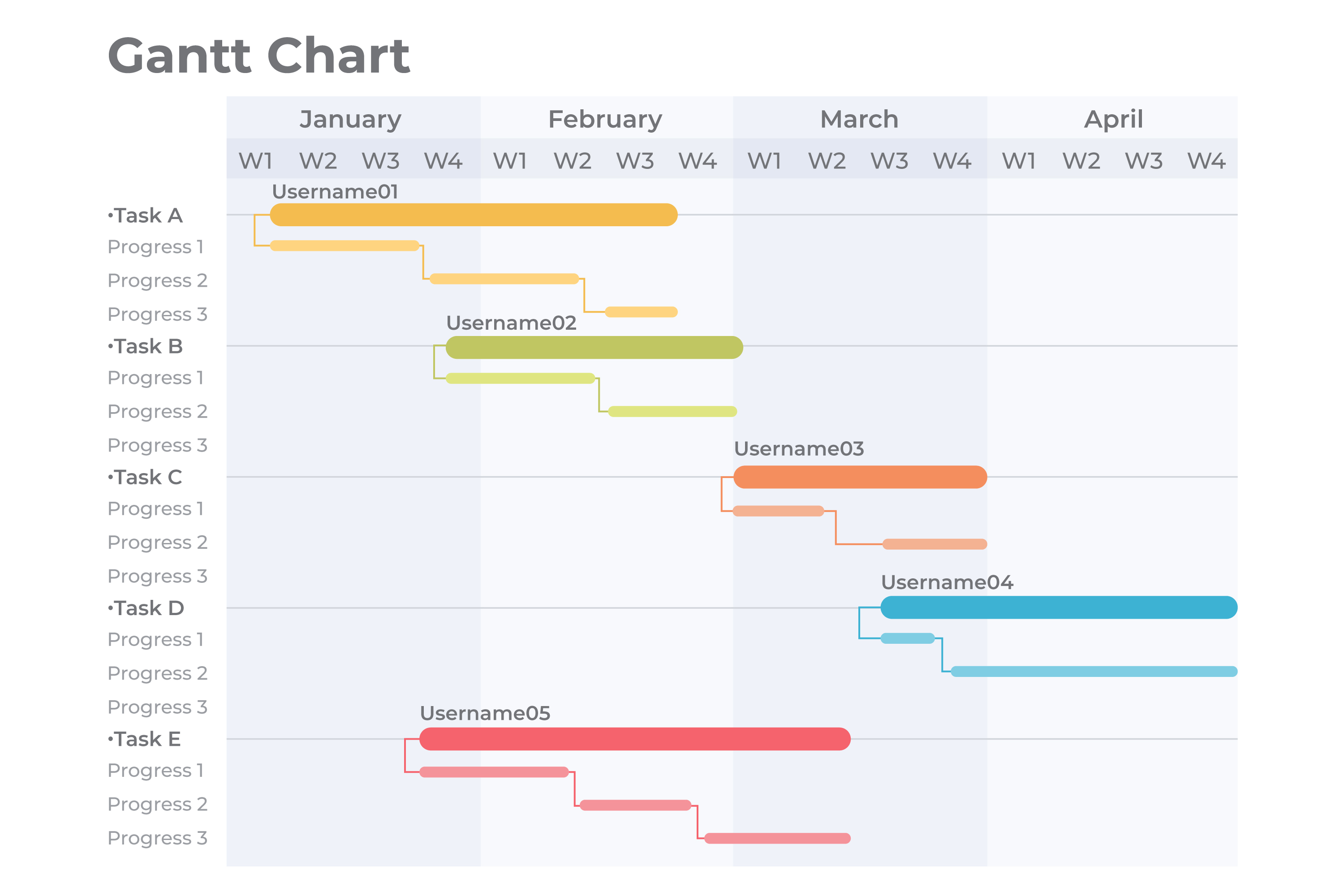
A Gantt chart is a visual project management tool that illustrates a project schedule by displaying tasks along a timeline. Developed in the early 20th century, it has become a fundamental tool in planning, tracking, and coordinating complex workstreams across industries.
🔍 Key Features of a Gantt Chart
- Timeline View — Tasks appear horizontally along a calendar, showing start and end dates.
- Task Bars — Each task is represented by a bar, with the length indicating task duration.
- Dependencies — Arrows or lines show relationships (e.g., Task B starts after Task A).
- Progress Tracking — Shaded areas of bars visualize task completion.
- Milestones — Critical dates or deliverables are marked with distinct icons (like diamonds).
✅ Benefits of Using Gantt Charts
- Clarity — Offers a visual overview of timelines and task sequencing.
- Resource Management — Helps plan workloads and avoid resource conflicts.
- Deadline Management — Keeps teams aligned with key delivery dates.
- Collaboration — Enhances coordination by making roles and dependencies visible.
🎯 Common Use Cases
- Software Development — Tracking sprints, releases, and dev cycles.
- Construction Projects — Managing permits, materials, and building phases.
- Event Planning — Coordinating logistics, marketing, and vendors.
- Marketing Campaigns — Scheduling creative production and launch timelines.
🧠 The True Inventors: Karol Adamiecki & Henry Gantt
While the Gantt chart is named after Henry Gantt, the concept traces back earlier.
- Karol Adamiecki (1866–1933), a Polish engineer, created a similar visual planning tool called the harmonogram in the 1890s. However, his work remained less known outside Eastern Europe due to language barriers.
- Henry Gantt (1861–1919), an American mechanical engineer, independently developed his version in the 1910s. It gained traction in U.S. manufacturing and wartime logistics, especially due to his ties with scientific management and Frederick Taylor.
Although Adamiecki’s contributions came first, Gantt’s version became globally recognized — hence the term “Gantt chart.”
📊 Explore the Top Gantt Tools
ClickUp — The All-in-One Powerhouse
ClickUp combines task lists, docs, time tracking, and Gantt views in one flexible workspace. With drag-and-drop functionality and real-time updates, its Gantt chart helps teams align easily. A generous free plan makes it ideal for startups and freelancers.
TeamGantt — The User-Friendly Classic
Designed for simplicity, TeamGantt offers intuitive timelines, dependencies, and resource views. Perfect for agencies or educators needing quick setup and easy onboarding. Free for small teams, with scalable plans available.
Smartsheet — The Enterprise Favorite
Built like a spreadsheet, Smartsheet appeals to data-driven teams needing advanced project controls. With built-in Gantt views, automation, and reporting tools, it’s ideal for enterprise environments. Free trial available.
GanttPRO — The Visual Specialist
GanttPRO is purpose-built for visual planning. It offers features like critical path analysis, baselines, and workload charts in a clean UI. A great fit for PMs looking for a focused Gantt experience. Free trial included.
Wrike — The Agile Gantt Adapter
Wrike’s “Timeline View” blends Gantt visuals with agile-style task handling. It supports marketing, product, and service teams with templates, request forms, and team dashboards. Free plan available; Gantt tools in higher tiers.
Monday.com — The Customizable Collaborator
Monday’s timeline and Gantt features give you the freedom to build project flows visually. It’s modular, colorful, and great for teams who want control over views and integrations. Free for small teams; Gantt in Pro and Enterprise tiers.
Microsoft Project — The Industry Titan
A mainstay in corporate PM offices, Microsoft Project provides detailed Gantt capabilities, from baselining to earned value tracking. Best suited for complex, multi-phase projects. Paid only, part of Microsoft 365.
Asana — The Team-Friendly Tracker
Asana’s Timeline feature turns tasks into Gantt-style visualizations with dependencies and deadlines. It’s great for small-to-midsize teams managing content, sprints, or campaigns. Timeline included in Premium and above.
Notion + Timeline Views — The Creative Hybrid
Notion’s timeline view offers a Gantt-lite experience for creators and planners. It’s not as feature-rich as dedicated tools but works well for solo users, educators, or content teams. Free and paid versions available.
Instagantt — The Asana Companion
Instagantt syncs seamlessly with Asana or can operate solo. It adds robust Gantt features like estimated hours, costs, and workload balancing. Free trial available with affordable plans.
Redbooth — The Visual Collaboration Suite
Redbooth includes a native Gantt chart for visualizing tasks and deadlines, perfect for dynamic teams juggling multiple clients or workstreams. Supports file sharing, chat, and video integration. Free tier with basic tools.
💥 Why These Gantt Tools Matter
These tools go far beyond static schedules. They’re designed to align teams, visualize progress, and optimize resources. Whether you’re launching a product, renovating a space, or planning an event, the right Gantt tool turns uncertainty into strategy.
Tools like ClickUp, TeamGantt, and Asana provide free access for startups and individuals. For larger teams, Smartsheet and Microsoft Project offer powerful control and integrations. Whatever your scale, there’s a Gantt tool to match.
📄 Quick Reference: Tool List
Here’s a concise list of all featured Gantt tools with use cases:
- ClickUp — All-in-one Gantt + task platform
- TeamGantt — Intuitive, beginner-friendly timelines
- Smartsheet — Spreadsheet-style planning for pros
- GanttPRO — Gantt-focused interface for PMs
- Wrike — Agile + waterfall hybrid planning
- Monday.com — Modular workflows with Gantt views
- Microsoft Project — Enterprise-scale Gantt precision
- Asana — Gantt-style timelines for collaborative teams
- Notion — Lightweight timelines for flexible planning
- Instagantt — Visual Gantt built for Asana
- Redbooth — Gantt meets collaboration in one app
Need visual clarity or better teamwork? Dive into one of these tools and take control of your next big project.